A Chrome extension that sorts Hacker News comments by time —
and shows you what’s new since you last read the thread.
Hacker News orders comments by score and reply structure. There is no way
to read a thread chronologically, which makes the question you actually
have when you come back — what was said since I last looked?
— surprisingly hard to answer. cwHN adds a small toolbar to every
story page: sort Newest or Oldest, or put
Hacker News’ own order back. Comments posted since your previous
visit are highlighted.
Zero requests
Reads timestamps from the page HN already rendered. No API, no server
Votes still work
Moves HN’s own rows instead of rebuilding them, so every link stays live
Manifest V3
One permission: storage. No build step, vanilla JS, 19 KB unpacked
Chrome 116+ · Manifest V3 · 10 KB
Unzip to a permanent folder, open chrome://extensions,
enable Developer mode, click Load unpacked, and select
the hn-comment-sort folder. No configuration, no API key.
Screenshots
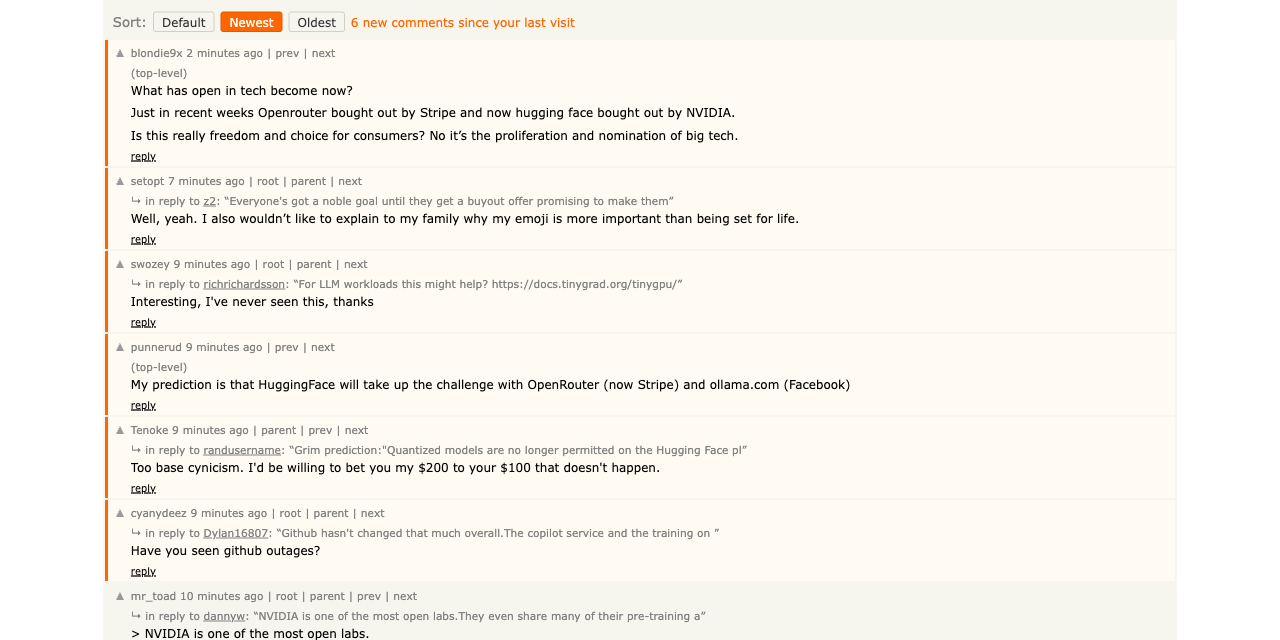
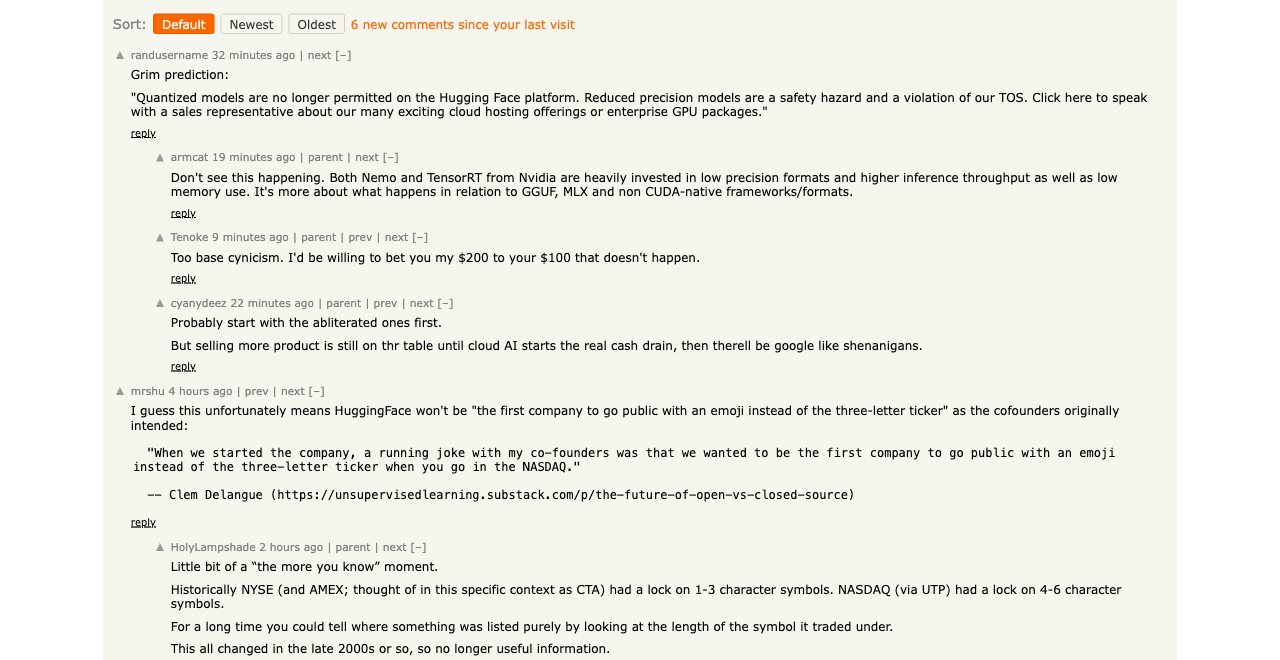
Newest first — flattened into time order, with reply context and new-since-last-visit highlighting.Default — Hacker News’ own order, indentation and togglers restored exactly.
What it is
cwHN is a Manifest V3 extension that runs only on Hacker News story pages.
When you open a thread it injects a toolbar above the comments:
Newest and Oldest flatten the thread into
pure time order. Time order and tree structure are incompatible — a
reply can be older than a top-level comment posted later — so the
flat view abandons the tree and gives each comment a context line instead:
(top-level), or ↳ in reply to <user>
with a quoted snippet and a link that jumps straight to the parent.
Default puts Hacker News’ order back exactly as it
was served — not a re-derived approximation, but a snapshot taken
before the first sort, with indentation and collapse togglers restored.
Features
New since last visit
Comments posted since you last read the thread get an orange marker,
and the toolbar shows the count. Refreshing the page or re-sorting
does not clear them — only genuinely coming back later moves the
mark. That sounds obvious and is the single easiest thing to get
wrong: track one timestamp and the visit that shows you the
highlights is the same visit that erases them.
Reply context
Hacker News never states who a comment replies to; the tree exists
only as indentation. cwHN reconstructs every parent link from that
indentation, so a flattened comment can still tell you whose point
it is answering, with a link back to it.
Nothing breaks
Sorting moves Hacker News’ own table rows rather than rebuilding
them from data. Upvote arrows, reply links, user links and your
logged-in session are the real elements, just in a different order.
Remembers your choice
Your last sort mode is applied automatically to the next thread you
open. The first run after install leaves Hacker News alone —
installing an extension should not silently rearrange a site before
you have asked it to.
Fails quietly
Every failure path degrades toward “Hacker News works
normally”. A comment with an unreadable timestamp is skipped
rather than crashing the sort; if storage is unavailable, sorting
still works and only the memory is lost; if a sort throws midway, the
page is put back rather than left half-reordered.
Privacy
cwHN makes no network requests at all — not to
Hacker News, not to an API, not to me. Everything it needs is already in
the page: Hacker News puts an exact UTC timestamp in the title
attribute of every comment’s age link, and encodes the reply tree as
indentation. Both are read straight out of the rendered DOM.
The extension requests exactly one permission, storage, used
for two things: which sort mode you last picked, and when you last read
each thread. Both stay in your browser. There is no host permission, no
background service worker, no analytics, and no remote code.
FAQ
Why isn’t this on the Chrome Web Store?
It may be later. For now it installs unpacked, which is
why the steps below ask you to turn on Developer mode. The upside is
that the folder you load is the actual source — eight small files
of plain JavaScript you can read in a few minutes before trusting it
with your browser.
Does it work on very large threads?
Mostly. Hacker News itself truncates enormous threads
behind a “More” link, and cwHN can only sort what Hacker
News actually rendered — comments hidden behind that link are
missing from the flat view. Typical threads, including 500+ comment
front-page discussions, render in full and sort completely.
Will it show me flagged or dead comments?
No. Hacker News hides flagged and dead content itself,
and cwHN leaves that exactly as served. Flattening the tree never
surfaces something Hacker News chose to hide from you.
Does it work in Edge, Brave or Arc?
Yes. It is a standard Manifest V3 extension with no
Chrome-specific APIs beyond chrome.storage, so any
Chromium-based browser that supports Load unpacked will run it.
Does it need an account or API key?
No. There is nothing to configure. Install it, open a
thread, click Newest.
Install
cwHN is a Chrome Manifest V3 extension. It runs in any Chromium-based
browser (Chrome 116+, Edge, Brave, Arc), and installs unpacked.
Chrome 116+ · Manifest V3 · 10 KB · v1.0
No account, no API key, nothing to configure.
Download cwHN.zip and unzip it. You will get a folder
called hn-comment-sort.
Move that folder somewhere permanent — Chrome loads it from
this path every launch, so don’t leave it in Downloads and don’t
delete it afterwards.
Open chrome://extensions in a new tab.
Turn on Developer mode with the toggle in the top
right.
Click Load unpacked and select the
hn-comment-sort folder.
Open any Hacker News story page. The Sort: toolbar
appears above the comments.
On first run, nothing moves. The toolbar starts on
Default, and highlighting needs a previous visit to compare
against — so the thread you install on will show no marks. Click
Newest to sort, and come back to a thread later to see the
new-comment highlighting do its job.